The Rise of AI Bots
AI models learned to think. Now they're getting their own computers and learning to do the work. Here's how nine AI bots compare on features, prices and the machines they run on, and which one fits which job.
Introduction
In our Rise of Reasoning series in 2025, we looked at how AI models learned to “think” before they answer. In 2026, the next leap is already here: AI is learning to do.
A new class of products, which I’ll call AI bots, wraps a frontier model in an agent loop and gives it its own virtual computer, with a browser, a terminal, a file system and signed-in apps. Instead of handing you a draft, a bot logs in, clicks through, runs the code and comes back with finished work.
This guide compares nine of them: Grok Bot, ChatGPT Work and dots, Claude Cowork, Claude Duet, Tasks in Gemini, Meta’s Muse, Manus, Cursor Cloud Agents and Devin.
1. Models vs. Bots: What Actually Changed
A frontier model on its own is a brain without hands. AI bots add four layers on top of the model:
- Agent loop: the model plans, acts, observes the result and retries, often for hours, instead of producing a single reply.
- Virtual computer: a cloud VM or sandbox with a browser, a shell and storage, so the bot can work in tools that have no clean API.
- Persistence: files, sign-ins, memory and schedules survive between sessions, which turns one-off prompts into ongoing responsibilities.
- Approvals: hand-offs to you for passwords, payments and other consequential actions keep you in control.
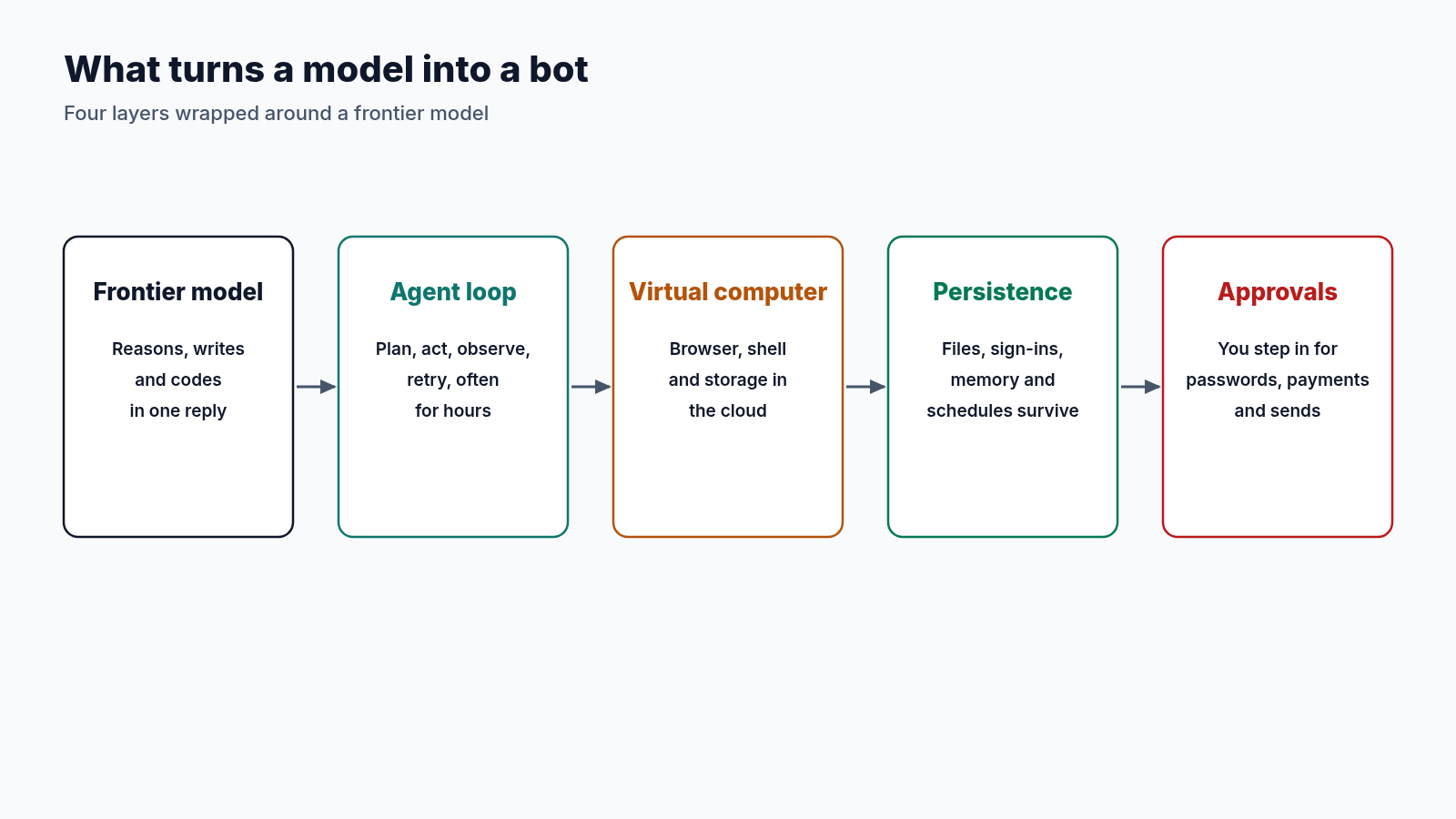
When you compare bots, these four layers are what to look at.
2. The Always-On Teammates
Grok Bot (xAI)
xAI launched Grok Bot in beta on August 11, 2026, describing it as “your team of always-on agents” that “have their own computer” and “keep working 24/7.” Each Bot has its own job, profile, memory and routines. A common setup is several Bots in parallel, such as an inbox Bot, a recruiting Bot and a bug-fix Bot, with a “chief of staff” Bot coordinating them.
All Bots on an account share one persistent cloud computer with a browser, command line and files, and each Bot gets its own screen so they can work in parallel. Work continues when your laptop closes. The Bot asks you to take over for passwords, two-factor codes, CAPTCHAs and payments. Per xAI’s security FAQ, each user gets a dedicated Firecracker microVM hosted in the United States, and sensitive actions can pass through Auto Review before they run.
There’s no standalone subscription. On the new X Subscription, Grok Bot is included on Premium ($30/month), Super ($100/month) and Ultra ($200/month), drawing on one weekly usage pool shared with Grok and Cursor, with prepaid top-ups once it runs out. Legacy Cursor Pro, Pro+, Ultra and Teams plans, and a linked SuperGrok, SuperGrok Plus, SuperGrok Heavy or X Premium+ account, also include it.
ChatGPT Work and dots (OpenAI)
OpenAI has rebuilt its agent lineup twice in a year. Operator was folded into ChatGPT agent, and the Help Center now says ChatGPT agent is no longer available and points to ChatGPT Work. Launched on July 9, 2026 alongside GPT-5.6, ChatGPT Work gathers information across your apps to produce finished sheets, slides, docs and web apps, and can stay with a project for hours. Per the Work admin FAQ, if your connected computer is unavailable when a new turn starts, an eligible Work task can continue in a cloud container, without access to that computer’s local files.
At the end of September, OpenAI added dots: always-on agents powered by GPT-6 Astra, each with “its own computer,” that keep making progress between conversations. The first dot is included with ChatGPT Pro and Business Premium seats. Business seats are $25/month ($20 billed annually) for Standard and $125/month ($100 annually) for Premium, and OpenAI’s pricing page lists three Pro usage tiers, which Layer3 Labs reports at $100, $200 and $500 a month.
Tasks in Gemini (Google)
At I/O 2026, Google announced Gemini Spark, a 24/7 agent since renamed Task inside the Gemini app. Per Gemini Help, tasks can use your local Chrome browser or a remote cloud browser that keeps working after you close your device, plus a remote computer for code execution whose data persists until you delete it. Up to 15 tasks can run at once.
Tasks need Google AI Pro ($19.99/month) or AI Ultra ($99.99 or $199.99/month), a personal Google account and a supported country. The big advantage is native access to Gmail, Calendar, Docs, Sheets and Drive.
Claude Duet (Anthropic)
On October 21, 2026, Anthropic opened a research preview of Claude Duet, “a new app where Claude works as a proactive agent,” built for professionals and small business owners and designed around Claude Opus 5.5. Each morning it sends a short brief, then checks your connected apps every few hours and messages you only when something needs you. It carries over your Claude memory, skills and connectors, and works on a cloud virtual machine with its own browser, so your laptop and phone can be off.
Before it sends a message, pays, signs or deletes anything, it shows you the action and waits for approval, and trading securities or moving money between accounts are off-limits even if you approve. Per Anthropic’s safety post, it never sees your passwords, cookies or sign-in tokens. Duet is a standalone app on iOS, Android and claude.ai, available by waitlist and starting with US Pro and Max subscribers. During the preview it’s included in those plans and uses their usage limits.
Muse (Meta)
On September 8, 2026, Meta launched Muse, a personal agent powered by the Muse Spark model family from Meta Superintelligence Labs. It’s on the web at muse.ai, on iOS and Android, and inside WhatsApp, and it focuses on everyday tasks: booking appointments, filling out forms, watching for price drops and making purchases.
Like Grok Bot, Muse gets its own computer. Meta says you and your Muse share “your own dedicated computer in the cloud,” an isolated Linux box with a browser. Security is the headline: per Meta’s safety write-up, a separate Sentinel agent on the same VM acts as the permission authority for connectors and outbound traffic, passwords stay in a Secure Credentials Store the model never sees, and purchases need your approval.
Muse is free with a usage limit. Paid plans are Power at $20/month (500 million Muse tokens per week) and Maximum at $100/month (3 billion tokens per week). Privacy is the open question: TIME reported in October that Muse keeps hourly-updated profiles of its users and the people they mention.
3. The Task Runners and Builders
Claude Cowork (Anthropic)
Anthropic launched Claude Cowork in January 2026 with an unusual design: code ran in a Linux VM on your computer, isolated by Apple’s Virtualization.framework on macOS or Hyper-V on Windows. Since October 6, 2026, new Cowork tasks on Pro and Max run in per-session cloud sandboxes. As Cowork lead Felix Rieseberg put it, people didn’t love that “closing your laptop means the work stops.”
The trade-off is a stricter, more short-lived model. Each session’s sandbox is destroyed when the session ends, can’t reach private addresses by default, and sends traffic through an allowlisting proxy. Since September 16, Cowork has been merging into the main Claude app on Pro and Max. It’s included with Claude Pro ($20/month, or $17/month billed annually) and Max ($100 or $200/month).
Manus
Manus popularized the idea of an agent with “a real cloud computer.” Every task gets an isolated Manus Sandbox with networking, a file system, a browser and root access. Idle sandboxes sleep and wake on demand, and are recycled after 7 days on Free or 21 days on Pro, with key artifacts restored.
Manus is also the most open about hardware. Its persistent Cloud Computer runs Ubuntu Server 24.04 LTS with 2 vCPUs, a dedicated public IP and three tiers: 1 GB RAM / 35 GB storage ($10/month), 4 GB / 70 GB ($30) and 8 GB / 120 GB ($50). It’s command-line only, and its files are deleted if your subscription lapses. Agent usage itself is credit-based: per a September 28 pricing review by Carly, Pro plans start at $20, $40 and $200 a month and scale to much larger credit tiers.
Cursor Cloud Agents and Devin
Cursor Cloud Agents run each agent in an isolated cloud VM with managed lifecycle, saved environments, snapshots and artifact capture. Tool calls can also run on hardware you control, through My Machines for one person’s machine or Team Pools for enterprise fleets. Usage is billed at model rates, and Cloud Agents are included from the $30/month X Subscription Premium tier (not Free or Plus).
Devin by Cognition boots every session from a saved Linux snapshot, with optional Windows and macOS snapshots. Pro, Max and Teams accounts can also run sessions on their own machines through Outposts. Its self-serve plans are Free, Pro ($20/month), Max ($200/month) and Teams (from $80/month).
4. The Frontier Models Underneath
Every bot above runs on a frontier model, and teams can buy the same models through APIs. The current flagships are GPT-6 Astra (1.05M-token context), Claude Fable 5.1 and Opus 5.5, Gemini 4 Argon (1M-token context), Grok 4.7 (500K-token context), and Meta’s Muse Wonder 1.0 and Muse Spark 1.3 (1M-token context).
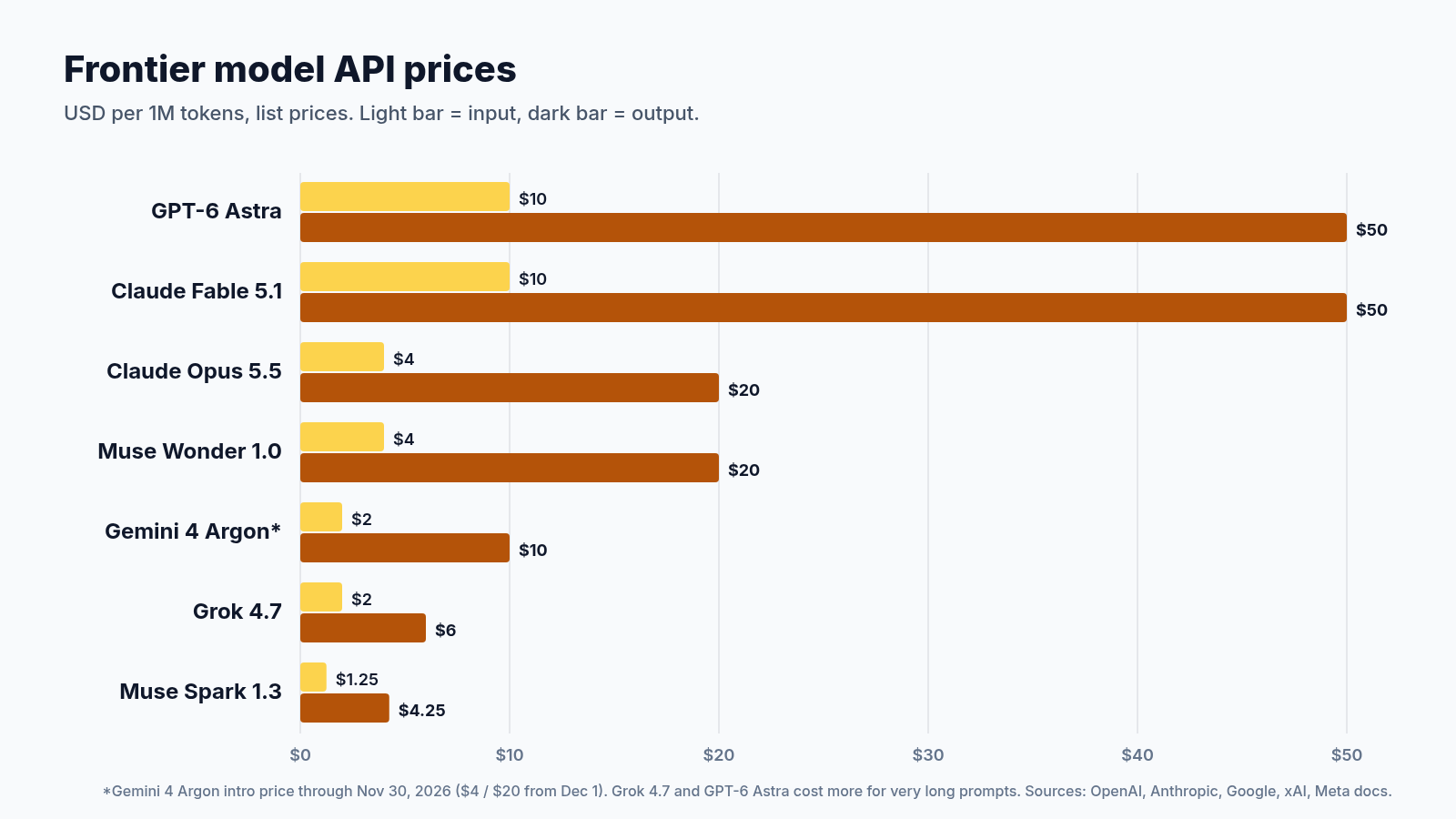
The spread is wide. GPT-6 Astra and Claude Fable 5.1 cost $10 input and $50 output per million tokens. Anthropic’s Claude Opus 5.5 and Meta’s Muse Wonder 1.0 cost $4 and $20. Grok 4.7 costs $2 and $6 for prompts under 200K tokens, and Muse Spark 1.3 undercuts the field at $1.25 and $4.25. Gemini 4 Argon’s introductory $2 and $10 runs through November 30, 2026.
Why this matters for your bill: a long-running bot can burn millions of tokens in a single job. That’s why subscriptions meter usage in allowances or credits, not messages.
5. Pricing: What You Pay for a Bot With a Computer
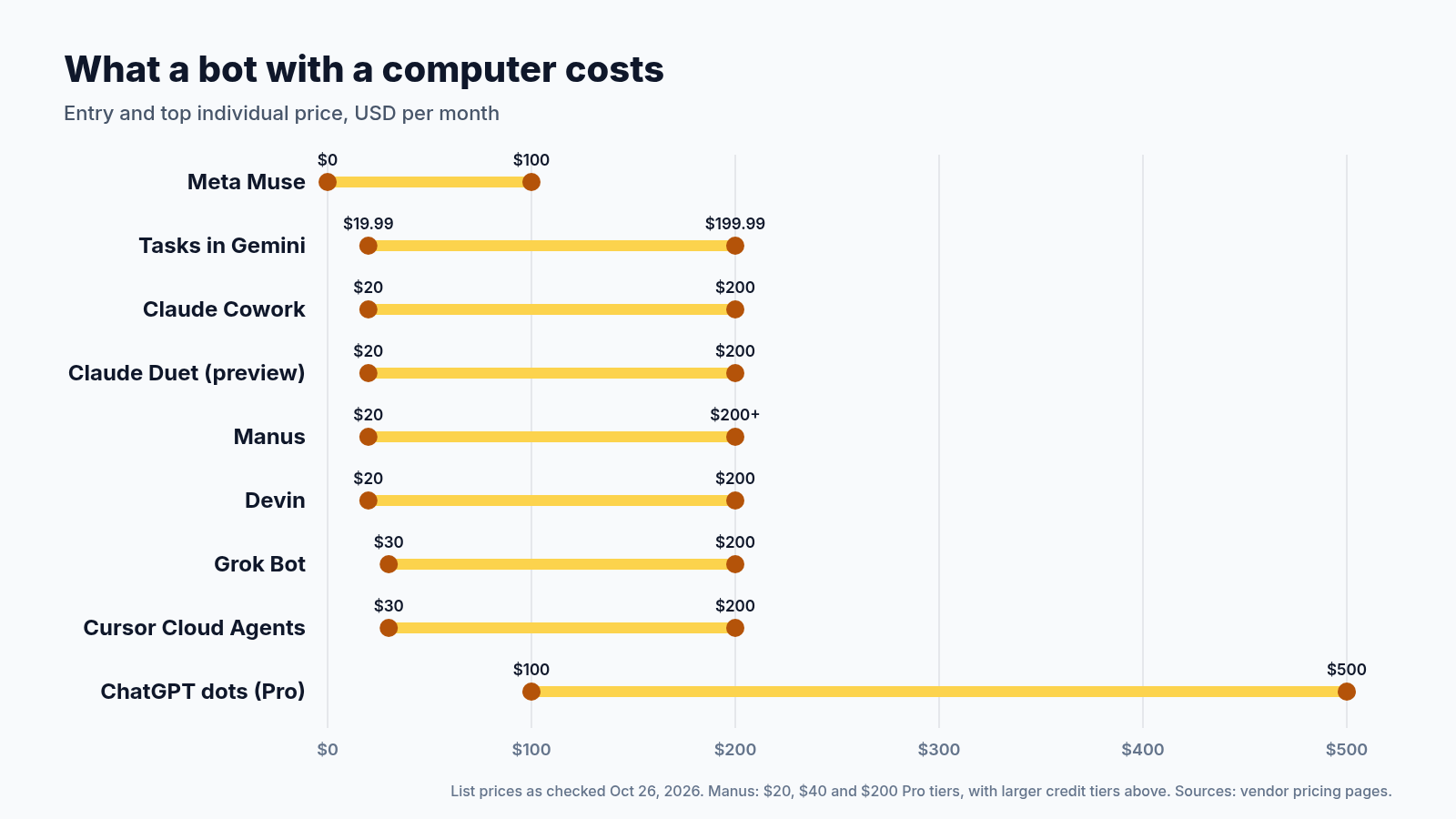
Pricing has settled on a familiar ladder of roughly $20, $100 and $200 a month, with OpenAI’s $500 Pro tier as the outlier. The real differences hide in what each tier includes:
- Grok Bot and Cursor Cloud Agents share one usage pool.
- OpenAI keeps always-on dots for $100+ plans.
- Manus sells persistent compute separately from agent credits.
- Meta is the exception on clarity: Muse publishes hard weekly token allowances and pairs its computer with a free tier.
Most vendors publish allowances as multipliers (“5x,” “20x”) rather than hard numbers. The only reliable test is to run your own workload for a week and watch the usage meter before you upgrade.
6. VM Specs: What Is Actually Disclosed
Transparency is the weakest part of this market. Of the nine products, only Manus publishes CPU, RAM and storage for its persistent machine. Devin and Cursor let customers run work on their own hardware but don’t list default specs. OpenAI, Anthropic, Google and Meta describe isolation and data retention in detail, but not hardware.
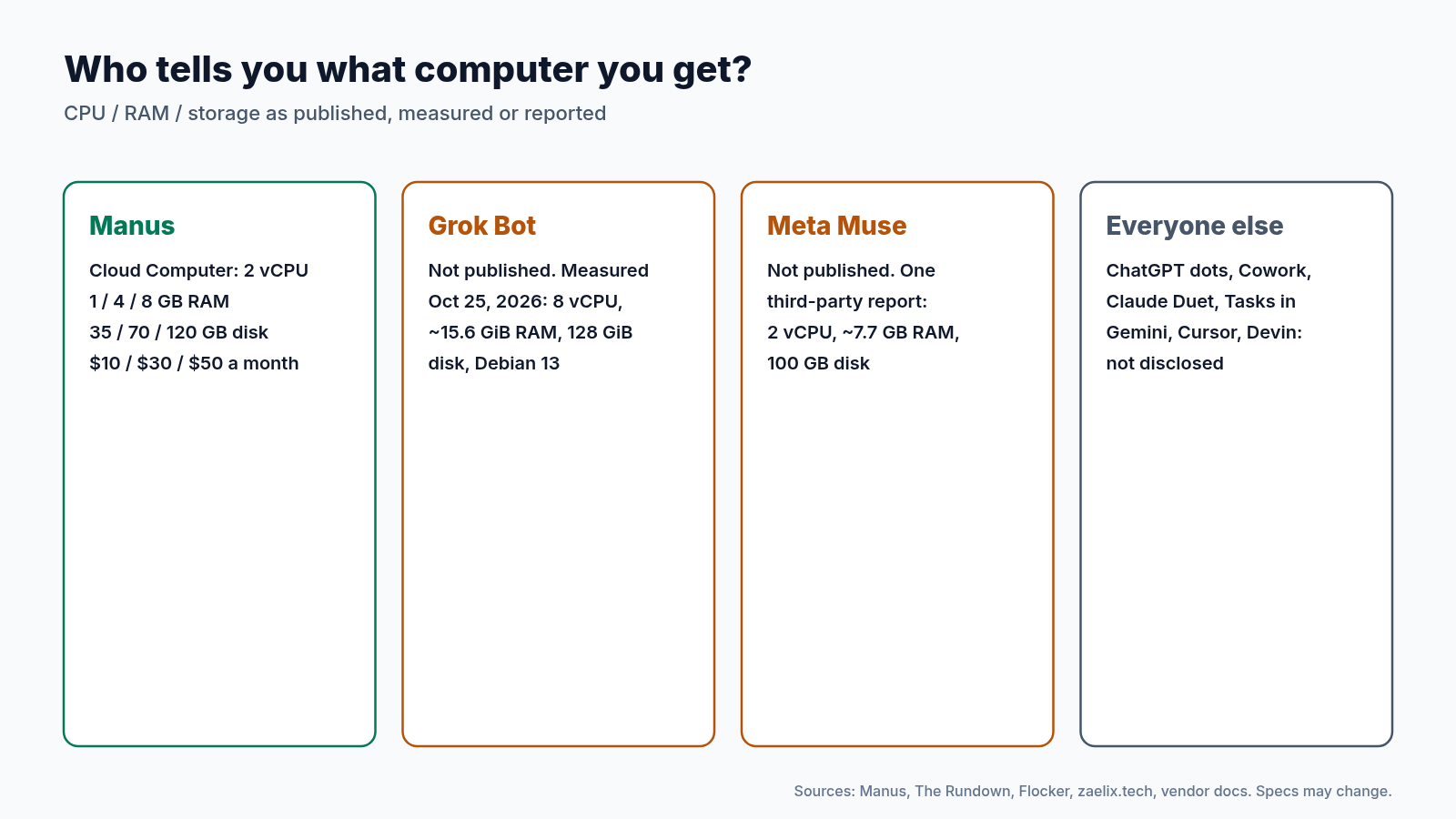
Two data points fill a little of the gap. When we checked our own Grok Bot computer on October 25, 2026, it reported 8 vCPUs (Intel Xeon), about 15.6 GiB of RAM, a 128 GiB disk and Debian GNU/Linux 13, in line with an independent report from Flocker in August. For Muse, one independent user reported 2 AMD EPYC cores, about 7.7 GB of RAM and a 100 GB disk.
For most knowledge work, raw specs matter less than persistence.
7. Which Bot Fits Which Job
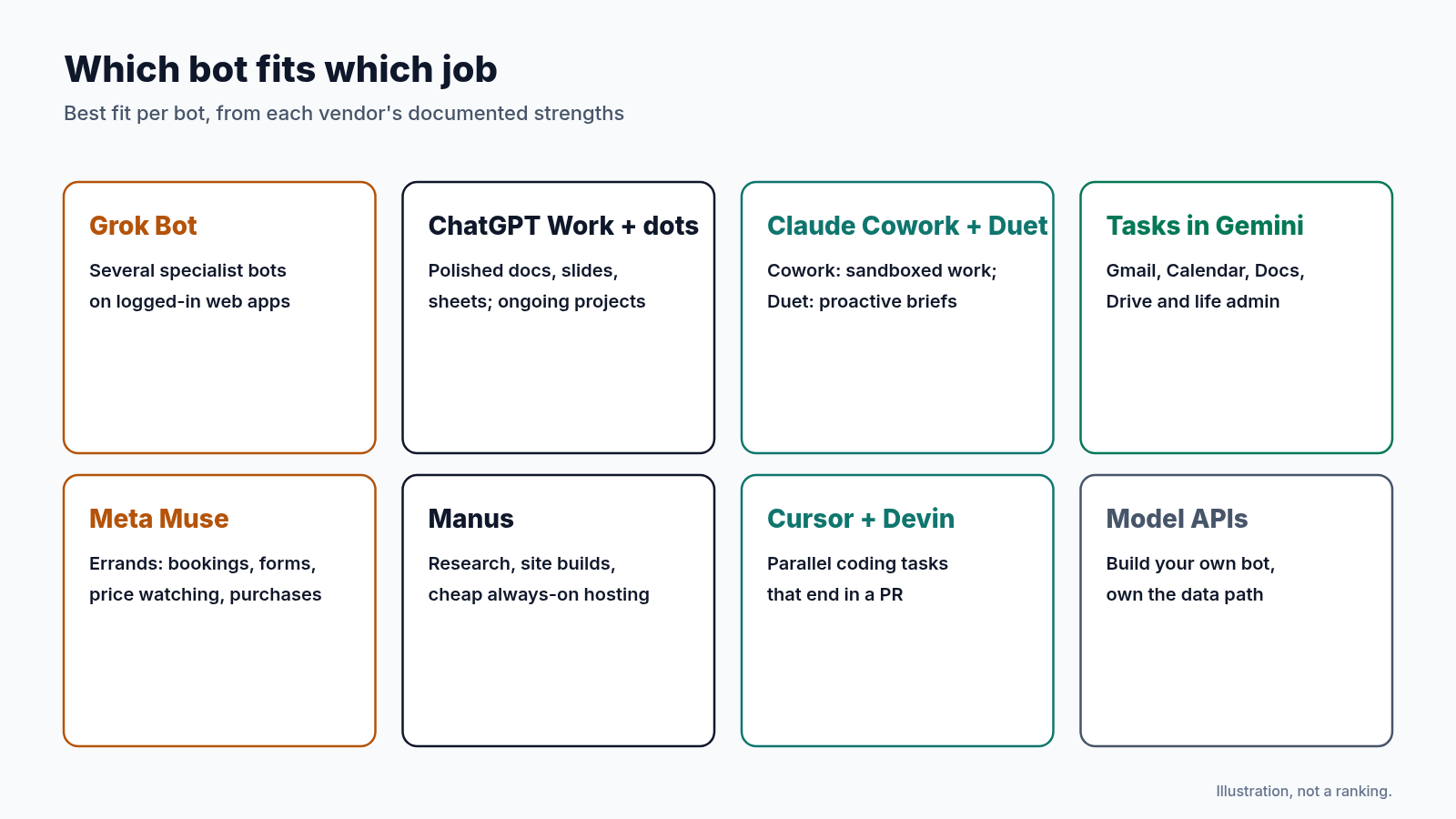
- Grok Bot: several specialist Bots in parallel on logged-in web apps, inboxes and tools without APIs.
- ChatGPT Work and dots: polished deliverables inside ChatGPT, and an ongoing responsibility handed to a dot on a Pro plan.
- Claude Duet: a work-focused morning brief and check-ins across your connected apps, if you can get off the waitlist.
- Claude Cowork: security-sensitive knowledge work where per-session isolation and folder-level access matter more than long-lived state.
- Tasks in Gemini: inbox cleanup, price monitoring, travel and document work across Google Workspace.
- Muse: everyday errands such as bookings, forms, price tracking and purchases.
- Manus: one-off research and website builds, plus cheap always-on hosting for bots and scripts on the Cloud Computer.
- Cursor Cloud Agents and Devin: parallel software tasks in reproducible environments that end in a pull request.
- Frontier models via API: teams that want to own the environment, the data path and the cost per token, and build their own bot.
Our tip (practical advice, not a vendor claim): pick one recurring job you already do every week, such as a morning inbox triage or a price watch. Give it to the bot that matches the list above, keep approvals on, and judge it after one week on two things: did the work get done, and how much of your allowance did it use?
8. Practical Limitations
- Prompt injection: OpenAI, Google and Meta all warn that malicious content on a web page or in an email can steer a bot. Keep approvals on for sending, purchasing and sharing.
- Shared state: on Grok Bot, every Bot on an account shares the same files and sign-ins, so separate Bots are not a security boundary.
- Blocked websites: some sites block automated browser agents, and logins, two-factor codes and CAPTCHAs still need a human.
- Opaque allowances: usage multipliers make cost hard to forecast, and a long job can use up an allowance in a single run.
- Availability varies: dots on personal Pro, Tasks in Gemini and Muse aren’t offered in every country yet. Check the vendor’s notes: OpenAI for dots, Google for Tasks in Gemini and Meta for Muse.
Conclusion
The rise of AI bots marks the moment AI moved from answering to finishing. Three trends to watch:
- Cloud over local: Anthropic’s move to cloud sandboxes shows that “work continues when the laptop closes” is now the baseline.
- Always-on teammates: Grok Bot, dots, Claude Duet, Muse and Tasks in Gemini all shift from single tasks to ongoing responsibilities.
- Pressure for transparency: as bots take on real work, expect demand for published VM specs, usage numbers and audit logs.
Note: All prices are USD list prices as checked October 26, 2026, and may change. “Not disclosed” means the vendor doesn’t publicly document the specification.
Where to Go Next
- Hire Your First AI Teammate: Setting Up Grok Bot for Real Work: our step-by-step setup of a first Grok Bot. → Read the story
- Hands-On with ChatGPT Work: one goal turned into finished sheets, slides and docs. → Read the story
- Setting Up a 24/7 Agent with ChatGPT dots: a daily inbox-and-project summary with safe permissions. → Read the story
- Claude Cowork Just Changed How Your Team Gets Work Done: what Cowork means for business leaders. → Read the story
- The Rise of Reasoning (Part 1): how models learned to think, the series this story continues. → Read the story
Know someone deciding which AI bot to try first? Share this guide with them.