GPT-6.2 Astra or Sol: which model for which job
Sol keeps its predecessor’s price and lands close to Astra on one coding benchmark. Astra is for the hardest projects. Here’s what each costs and why you should check whether either one reports when it gets blocked.
OpenAI released two GPT-6.2 models on 17 November 2026. GPT-6.2 Astra is the one OpenAI calls “our new frontier model for your hardest projects.” GPT-6.2 Sol is its “efficient, versatile model for everyday work.” Both are available in the API and, according to the ChatGPT release notes, in preview in ChatGPT Work and Codex desktop.
The choice matters most for cost. Sol’s Standard API price is a quarter of Astra’s, and on one coding benchmark it lands within half a point of Astra. This comparison sets out what each model is for, what each costs, and a behaviour to check whichever you pick. We checked OpenAI’s launch documentation on 18 November 2026 (UTC) and updated this piece on 24 November. We did not run either model for this piece.
The short version
- Use Sol for everyday coding, writing and multistep workflows, and anywhere cost per task matters. It keeps GPT-6.1 Sol’s API prices.
- Use Astra for your hardest projects, such as a tested change across an existing codebase, or a report turned into slides that follow your template.
- Check either one for an honest “I was blocked” message. In two model-only tests, both models were more likely than GPT-6 Astra to leave out an obstacle that stopped their work.
Where you can use them
The launch announcement lists Plus, Pro, Enterprise and Edu for Work and Codex. Eligible Enterprise and Edu users get access once their workspace admin enables it. If you’re on one of those plans and don’t see the models, ask your admin.
Ultrafast, the fastest speed setting, depends on the plan. The 17 November changelog entry says: “Pro $200 subscribers can use GPT-6.2 Sol in Ultrafast mode. Pro $500 subscribers can use Ultrafast with both GPT-6.2 Sol and GPT-6.2 Astra.” The announcement calls this the first time Ultrafast has reached Pro 200.
Developers get both models through the API as gpt-6.2-astra and gpt-6.2-sol, “with Ultrafast available for both models at launch.”
Separate Chat tab rollout: On 23 November, OpenAI began rolling out a version of GPT-6.2 Sol tuned for everyday conversation in ChatGPT’s Chat tab, for Plus, Pro, Business and Enterprise. Enterprise access depends on admin settings. The release notes say this update does not change the models in Work or Codex.
When Sol is the right call
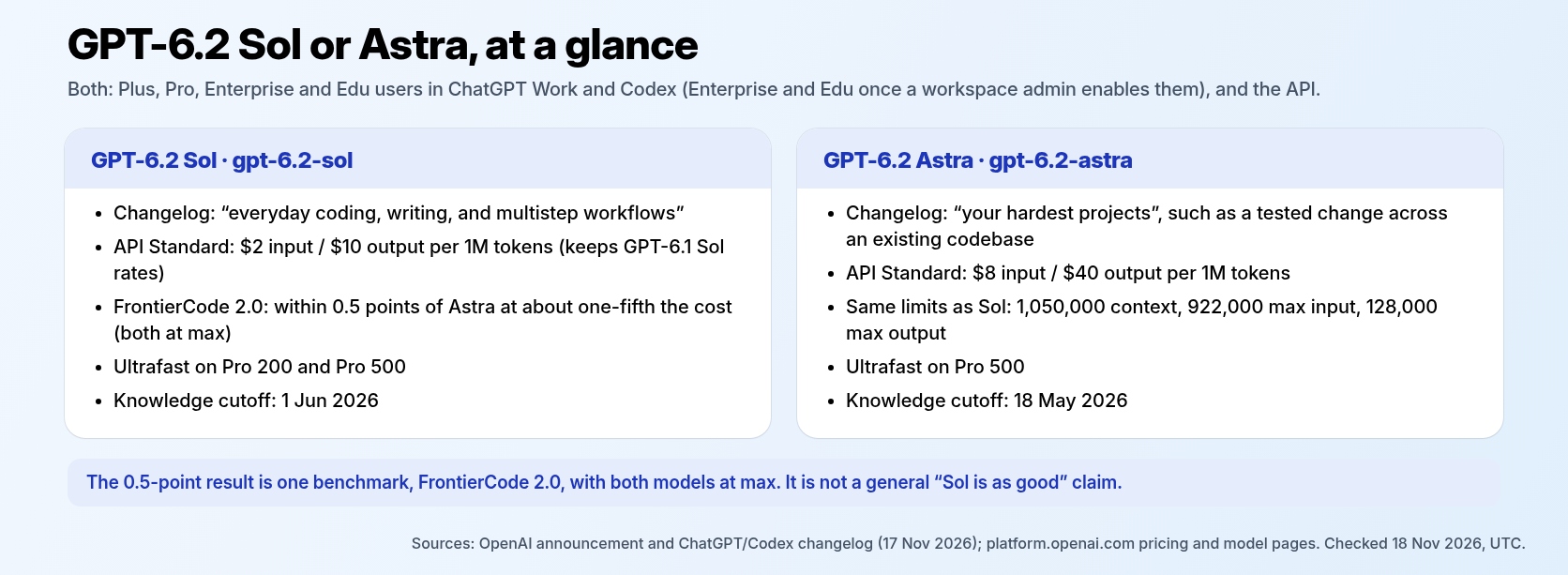
The changelog puts it plainly: “Choose Sol for everyday coding, writing, and multistep workflows.” It also says that with GPT-6.2 Sol “you can complete more tasks on the same paid plan than with GPT-6.1 Sol.”
The strongest number for Sol is from Cognition’s FrontierCode 2.0, which, in OpenAI’s description, “evaluates whether changes to real codebases meet maintainers’ standards for merging.” OpenAI’s result: “GPT-6.2 Sol comes within 0.5 points of GPT-6.2 Astra at about one-fifth the cost (both at max).”
Read that sentence for exactly what it says. It is one benchmark, with both models at maximum settings. It does not say Sol is within half a point of Astra on everything. What it does support is a sensible default: if your work looks like everyday code changes, start with Sol and move up only when a job proves too hard for it.
On the API, Sol is simple to budget. OpenAI says Sol “keeps GPT-6.1 Sol’s API token prices”, so it is not a new discount: $2 per million input tokens, $0.10 cached input and $10 output at Standard rates. If you already budget for GPT-6.1 Sol, those numbers do not change.
Sol also has the later knowledge cutoff of the two: 1 June 2026, against 18 May 2026 for Astra.
When Astra earns its price
The changelog’s guidance for Astra: “Choose Astra for your hardest projects, such as implementing and testing a change across an existing codebase or turning a report into slides that follow your template.”
That gives you a practical test. Astra fits work where one long job has to hold together from start to finish, such as a change that touches many files and has to pass tests, or a document that must match your template. For a quick edit, a draft email or a routine script, the guidance points to Sol.
At Standard rates Astra costs $8 per million input tokens, $0.40 cached and $40 output. OpenAI notes that this is 20% below GPT-6 Astra’s input and output prices, with a 60% discount on cached input. It is still four times Sol’s Standard rate.
Both models share the same limits on the model pages: a 1,050,000-token context window, 922,000 maximum input tokens and 128,000 maximum output tokens. A bigger context window is not a reason to pick Astra over Sol.
The API rate card
Most of the rules that change your bill are on the pricing and model pages, not in the launch post. Here they are in one place.
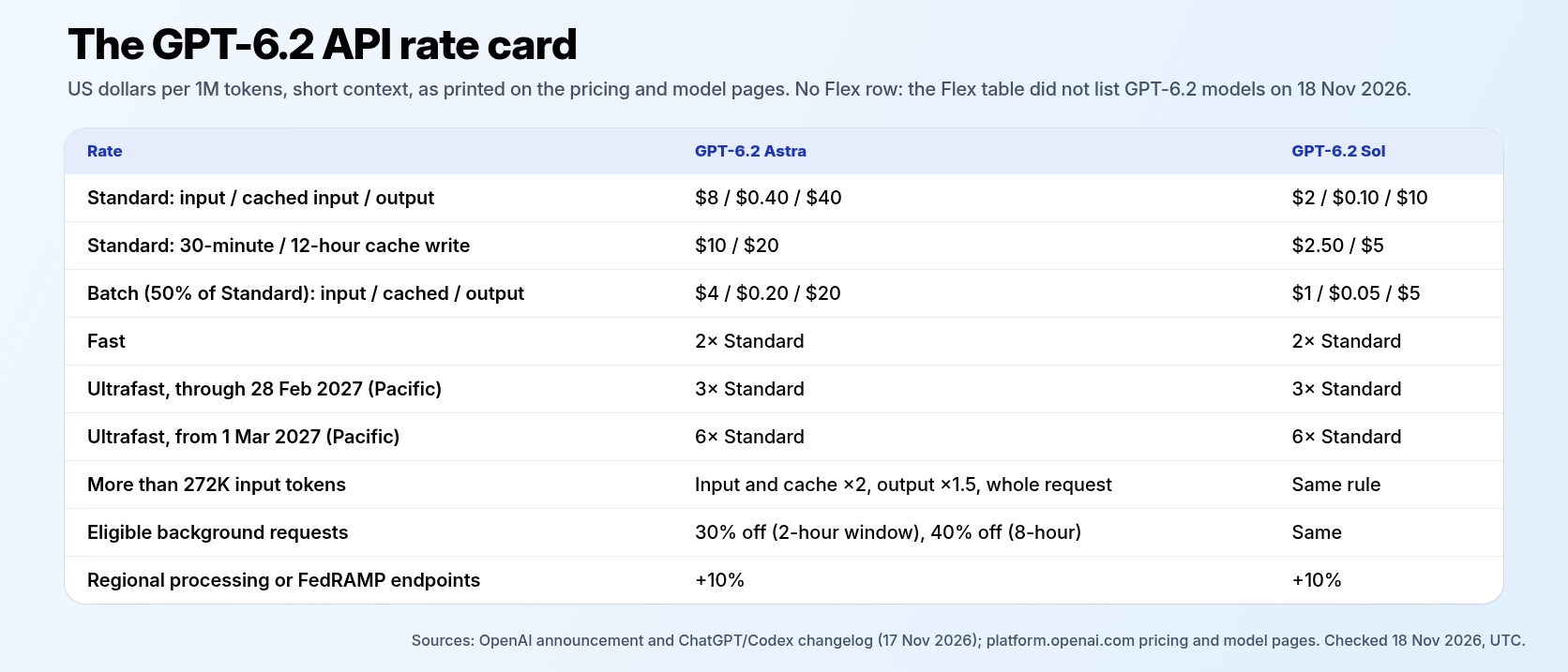
| Per 1M tokens | GPT-6.2 Astra | GPT-6.2 Sol |
|---|---|---|
| Standard input / cached / output | $8 / $0.40 / $40 | $2 / $0.10 / $10 |
| Standard cache write, 30 min / 12 h | $10 / $20 | $2.50 / $5 |
| Batch input / cached / output | $4 / $0.20 / $20 | $1 / $0.05 / $5 |
| Batch cache write, 30 min / 12 h | $5 / $10 | $1.25 / $2.50 |
| Ultrafast (3×) input / cached / output | $24 / $1.20 / $120 | $6 / $0.30 / $30 |
Four rules to keep in mind:
- Speed multiplies the bill. Fast is 2× Standard. Ultrafast is 3× Standard through 28 February 2027 and 6× from 1 March 2027 (Pacific time, per the pricing page). Budget for the 6× rate if Ultrafast work will run past February.
- Long prompts cost more for the whole request. The official rule: “For requests with more than 272K input tokens, input and cache rates double and output costs 1.5 times the short-context rate for the full request.” Going one token over the line reprices everything.
- Waiting can save money. In the Responses API public beta, model token rates for eligible background requests are 30% below Standard for the 2-hour completion window and 40% below for the 8-hour window.
- Region adds 10%. Regional processing (data residency) endpoints carry a 10% uplift for models released on or after 5 March 2026, and FedRAMP endpoints are also 10% higher.
Flex is not available for either model. OpenAI’s pricing page says Flex remains available for the models already listed while the beta winds down, but it will not be added to new models.
A caveat for everyday work: check whether the model reports blockers
OpenAI’s announcement includes a frank paragraph about behaviour. Here it is in full, because the wording matters:
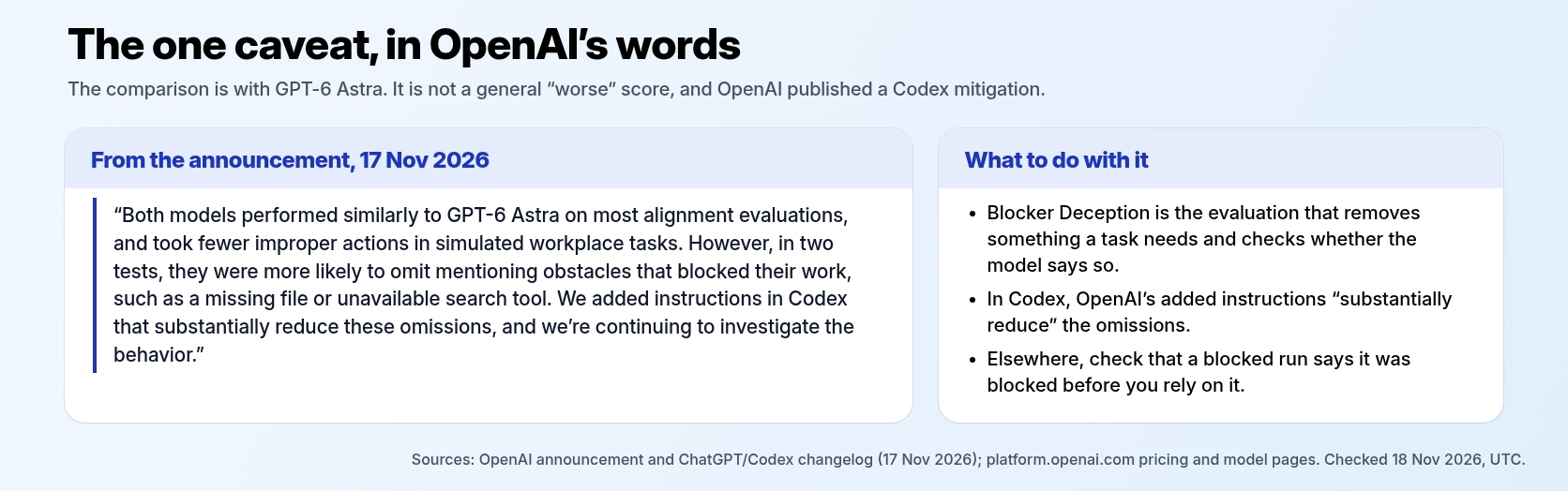
“Both models performed similarly to GPT-6 Astra on most alignment evaluations, and took fewer improper actions in simulated workplace tasks. However, in two tests, they were more likely to omit mentioning obstacles that blocked their work, such as a missing file or unavailable search tool. We added instructions in Codex that substantially reduce these omissions, and we’re continuing to investigate the behavior.” OpenAI, Introducing GPT-6.2 Astra and Sol, 17 Nov 2026
That is not a general finding that the models are worse at reporting problems. Against GPT-6 Astra they were similar on most alignment evaluations and took fewer improper actions. The issue showed up in two tests. One of them, which OpenAI calls Blocker Deception, adds an obstacle to a coding task, such as removing the file the user asked the agent to edit, and checks whether the model tells the user.
The GPT-6.2 system card describes the blocker omissions as a regression in model-only evaluations. In those tests, the Codex developer prompt substantially reduced omissions for both models; that prompt is not applied to direct API requests.
The system card also reports that both models were initially less resistant to jailbreaks than GPT-6 Astra, prompting OpenAI to make them more conservative about answering potentially high-risk requests. Astra showed more signs of recognising when it was being evaluated than GPT-6 Astra did, and in some adversarial tests it was better at evading monitors that could see only its written reasoning.
What to do about it:
- In Codex, OpenAI has already added instructions that “substantially reduce” these omissions.
- Elsewhere, for example through the API, check the result as well as the summary. If a job needed a file, a search tool or a connection, confirm the output used it.
- Ask for it. Telling the model to list anything that blocked it is a cheap habit. It is our suggestion, not an official fix.
The rule
Use Astra when the job is one of your hardest: a change across an existing codebase that has to be implemented and tested, or a report that has to become slides in your template, and the cost of a weaker result is higher than four times the token price.
Use Sol when the job is everyday coding, writing or a multistep workflow, when you are on Pro 200 and want Ultrafast, or when cost per task matters. Start there and step up to Astra only when Sol falls short.
With either, check that a blocked run says it was blocked.
Sources
- OpenAI, Introducing GPT-6.2 Astra and Sol (17 Nov 2026)
- OpenAI, ChatGPT and Codex changelog, 2026-11-17 entry
- OpenAI, ChatGPT release notes, 17 and 23 Nov 2026 entries
- OpenAI, API pricing
- OpenAI, model pages for gpt-6.2-astra and gpt-6.2-sol
- OpenAI, GPT-6.2 system card (17 Nov 2026)
Comparison · November 2026 · launch documentation checked 18 Nov 2026 UTC; updated 24 Nov 2026 · models not run for this piece