
Microsoft 365 Outage, 12–13 November 2026
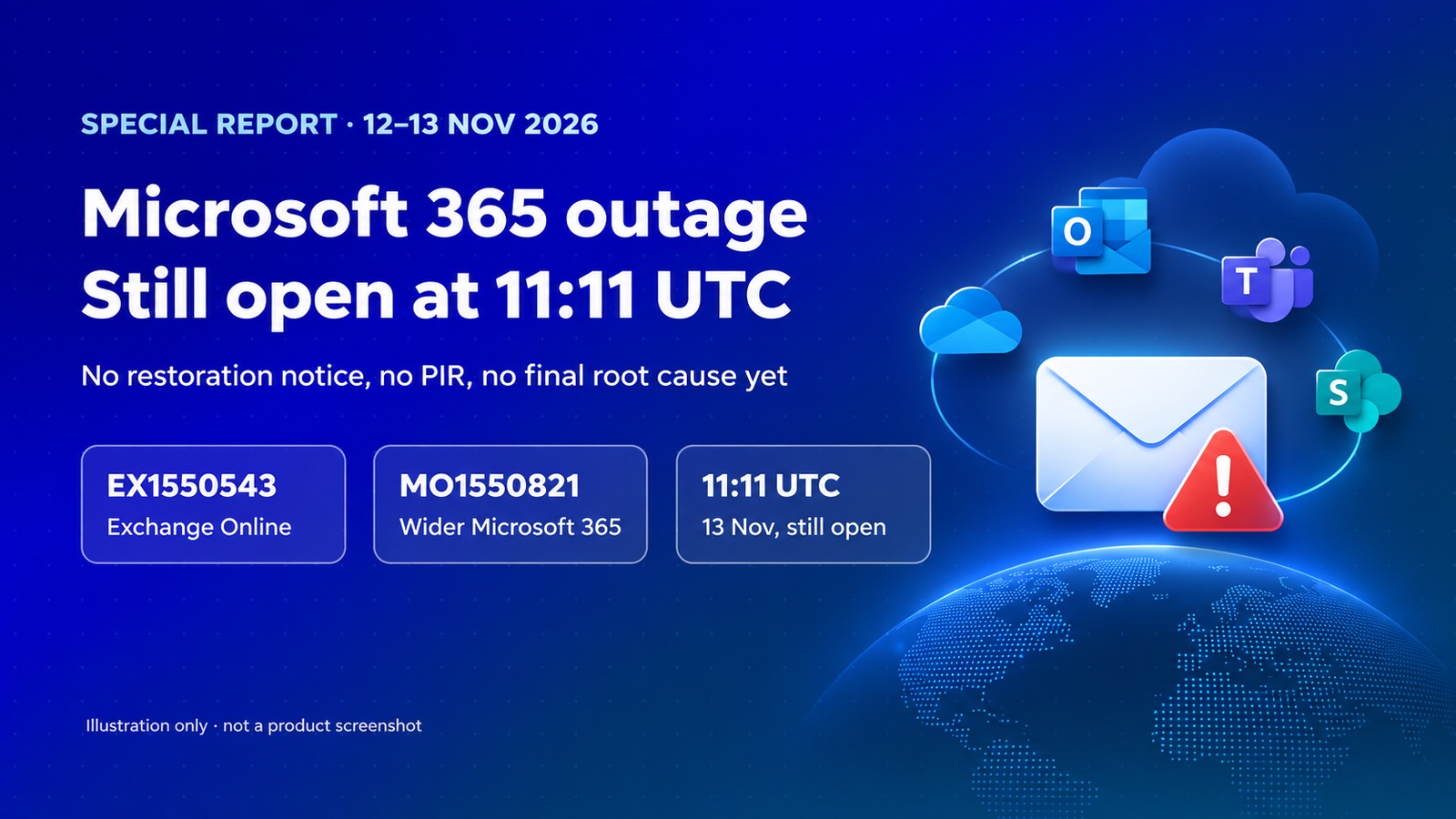
The incident was still ongoing at the last official @MSFT365Status update, 11:11 UTC on 13 November. There is no restoration notice, no post-incident review, and no final root cause yet.
Updated:
What to know
- Official incident IDs:
EX1550543(Exchange Online) andMO1550821(wider Microsoft 365).- First official acknowledgement: 17:54 UTC on 12 November, Americas mailbox access. By 18:07 UTC, Microsoft said it may affect Microsoft 365 connectivity in any region.
- At 09:24 UTC on 13 November, Microsoft extended the email timeout to 48 hours to help preserve delayed mail.
- At 11:11 UTC on 13 November, Microsoft had not declared the service restored. There is no official PIR and no final root cause.
- Official public status showed service degradation on Microsoft 365 (Business or Enterprise) and consumer products, and no Azure issues at the time of the check. This is not an Azure outage.
- Downdetector and other user-report totals below are as reported by Reuters and the Associated Press, not an official user count.
Confirmed: what Microsoft has said
The public official record is @MSFT365Status on X, status.cloud.microsoft, and Microsoft Learn’s Service Health guide. Admin-center incident text is tenant-authenticated. A longer service list later in this report is labelled as a partner reprint.
The first official public acknowledgement, at 17:54 UTC on 12 November, said Microsoft was investigating users “experiencing issues accessing Exchange Online mailboxes through multiple connection methods in the Americas,” under EX1550543. At 18:07 UTC, it said the issue “may affect Microsoft 365 service connectivity for users in any region.” From 18:35 UTC, a second ID, MO1550821, appears alongside EX1550543. Microsoft pointed administrators to both IDs, and to the public status page if the admin center was unavailable.
At 19:31 UTC, Microsoft said the elevated load “isn’t driven by an increase in traffic, but by a number of servers being unexpectedly unavailable; straining the remaining infrastructure.” Later official posts describe failed automated health checks, a component that processes server health, a core process on affected servers “becoming overwhelmed, causing capacity loss,” and servers that could become unresponsive again once they received traffic. Microsoft said it paused deployments, redistributed traffic, restarted or rebuilt servers, and applied traffic-management measures. These are operational findings in status updates, not a final PIR.
At 09:24 UTC on 13 November, Microsoft said it had extended the email timeout to 48 hours “to help preserve delayed mail.” At 10:28 UTC it restated the 48-hour timeout, and said “service health remains variable and capacity has not yet fully returned to baseline.” The latest official update used here, at 11:11 UTC on 13 November, reported further progress and improvements in mailbox access and delayed email processing, and said “some intermittent issues may continue.” Microsoft still pointed to MO1550821 and the public status page. There is no official “service restored” post.
The official UTC timeline
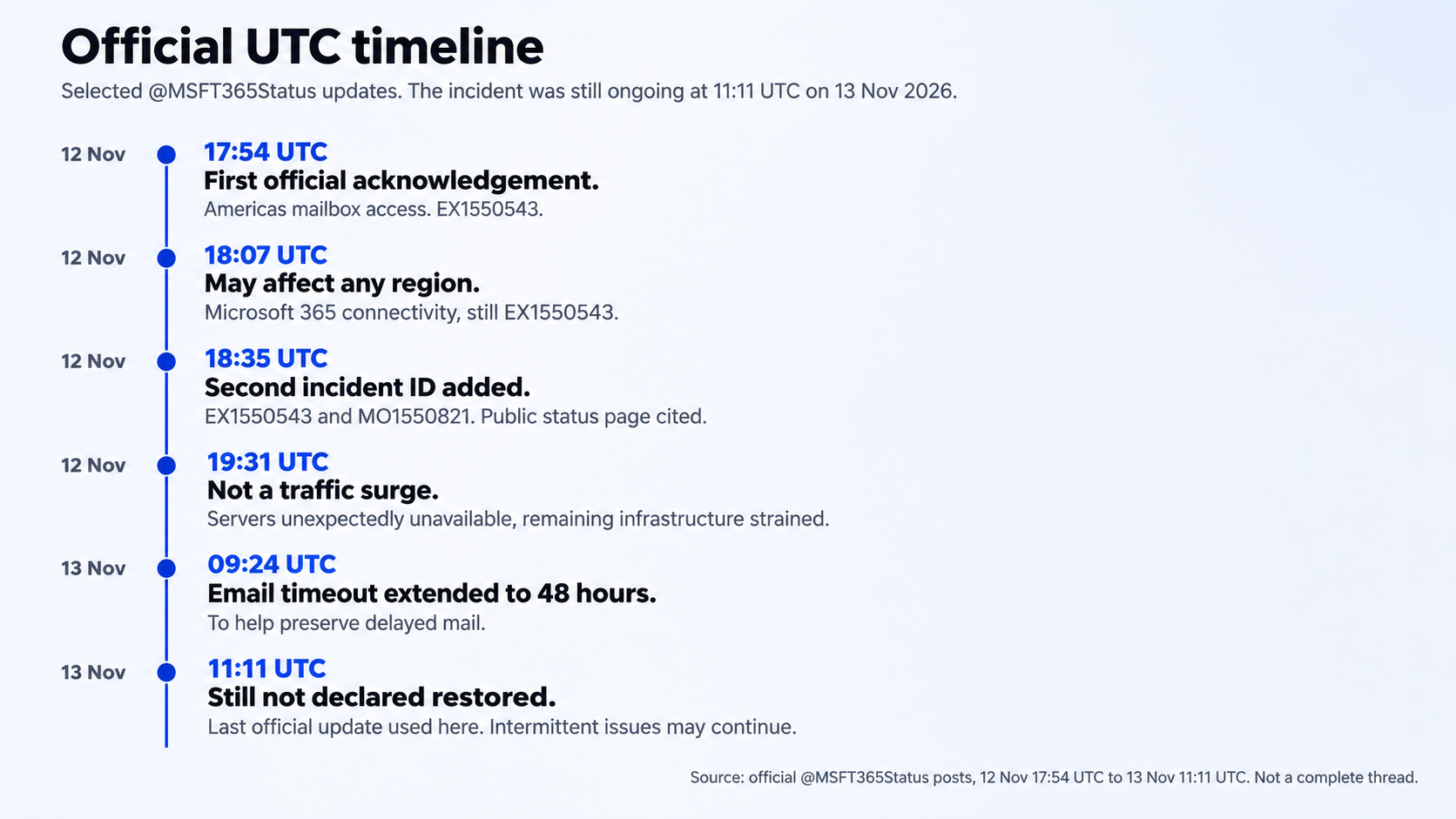
Microsoft has not stated an official estimated start time on X. The first official acknowledgement is 17:54 UTC on 12 November. Third-party start clocks are not official.
Which services were affected
From official X posts and the public status page: Exchange Online mailbox access, first in the Americas, then any region; broader Microsoft 365 connectivity under MO1550821; Microsoft consumer products in the public “service degradation” banner, without a service-by-service breakdown on the unauthenticated page; delayed mail, acknowledged by the 48-hour timeout; and Azure, where the public page said no Azure issues at the time of the check.
At 01:01 UTC on 13 November, Microsoft told administrators that a revised impact list is in the “more info” section of MO1550821. A TD SYNNEX partner page, labelled as Service Health Status from Microsoft, republished that framing and list. Its “current status” text matches an earlier official restart-and-monitor update, so treat the list as a snapshot, not the live 11:11 UTC state.
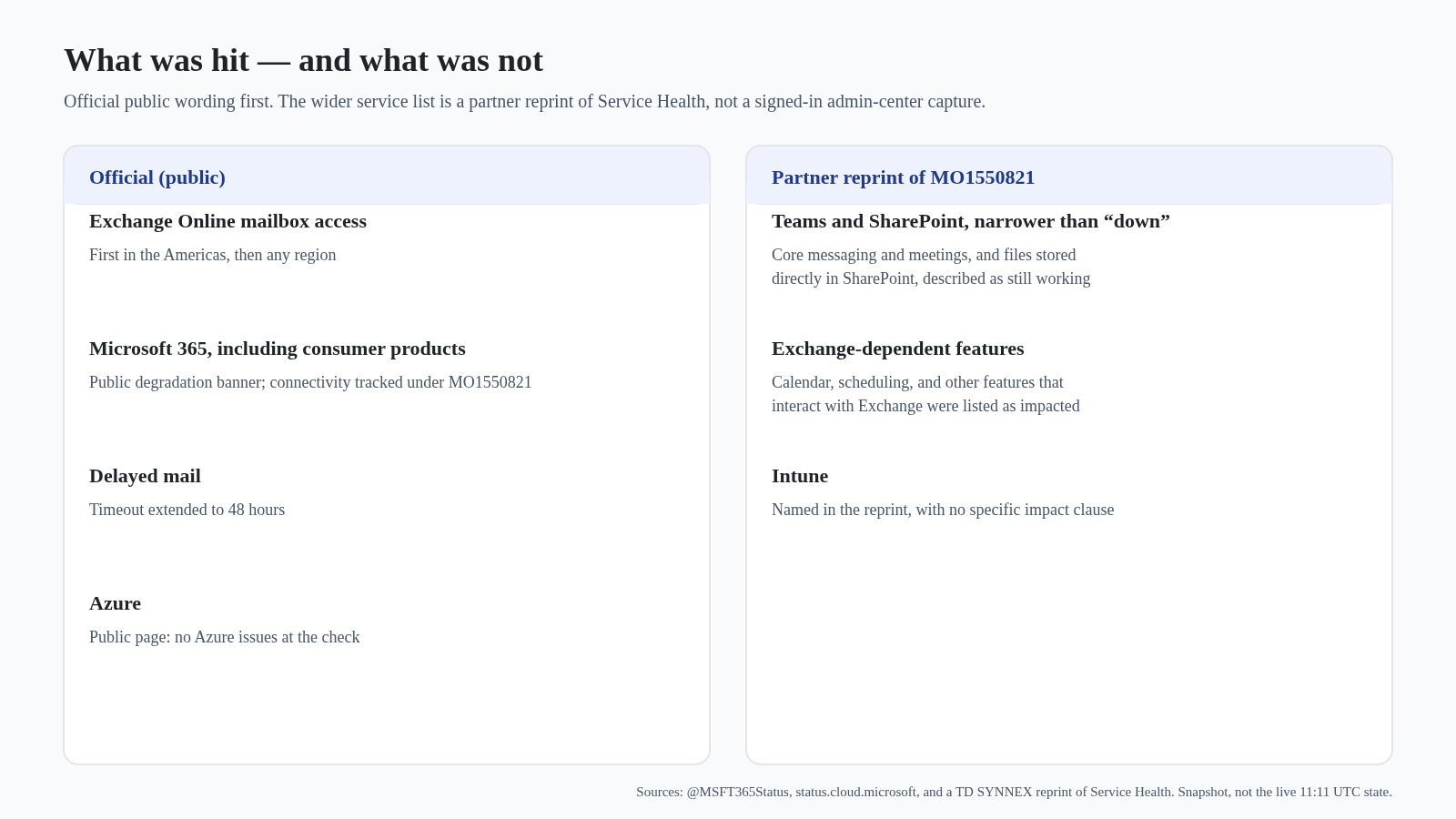
The reprint’s framing: “Features of the Microsoft 365 services below that interact with Exchange Online and email services are impacted. Elements of those services that do not depend on interaction with Exchange Online remain functional.” It listed Exchange Online clients (Outlook on the web, desktop/MAPI, Exchange ActiveSync, REST) and delayed delivery, plus other Exchange-dependent features — including some admin-center pages, Microsoft Copilot 365, Defender and Purview functions, Planner, Graph, Teams calendar and meeting scheduling, SharePoint features that depend on Exchange, Universal Print, and Windows 365 only where the tenant and Cloud PCs use Microsoft Purview Customer Key. It said “core messaging and online meetings remain largely functional,” and that “accessing files stored directly in SharePoint Online remains functional.” It also names Microsoft Intune without a specific impact clause; this report does not invent Intune symptoms. Third-party mirrors, including StatusStack and Flowbotics, similarly list those Exchange clients and say on-premises mail flow to or from Exchange Online may be affected.
Do not flatten this into “Teams is down” or “OneDrive and SharePoint are down.” Exchange-dependent features were hit; core Teams messaging and meetings, and files stored directly in SharePoint Online, were described as largely still working.
What is known about the cause — and what is not
There is no official PIR and no official final root cause. Microsoft Learn defines “Post-incident report published” as a Service Health status that appears after a PIR is issued; that status has not been seen for this event.
Official X updates evolved: first elevated load; then not a traffic increase, with servers unexpectedly unavailable; then failed health checks, and at 20:19 UTC on 12 November no recent change identified as correlated with the start of impact. At 21:40 UTC Microsoft was also assessing whether reverting a small number of recent configuration updates could help. Later it said a core process was becoming overwhelmed, causing capacity loss — earlier actions “have not provided the anticipated relief” — and that servers brought back could fail again under traffic.
A partner reprint of an earlier Service Health “previous status” is more specific — “a process on the affected servers responsible for establishing secure connections becomes overwhelmed,” and “we’ve begun reverting a recent network configuration change that correlates with the start of impact.” That wording was not repeated in the later official X posts above. It is a partner-republished snapshot, not a final cause.
The Register, quoting Microsoft’s status RSS, reported language about malicious activity at 04:11 UTC and 05:46 UTC, including “we are not aware of any malicious activity that is causing this incident.” A later StatusStack mirror includes a similar line and says Microsoft will share a full PIR after mitigation. Treat that as a then-current statement, not a completed investigation, and the PIR as promised, not published.
Speculation — do not treat as fact
A confirmed cyberattack, or “no cyberattack, case closed”; a named bug or a completed configuration rollback as the cause; an official resolution time, or that the service is fully restored; an official global user count, or phrases such as “millions of users” unless clearly quoting a named outlet; that Azure, or “all of Microsoft,” is down; or that Teams, OneDrive, or SharePoint are wholly unavailable.
Reported: scale and impact
Press outlets placed the start of user reports around 18:00 UTC on 12 November, close to Microsoft’s first public post at 17:54 UTC. The Register said the outage “started on Thursday at around 18:00 UTC.” The Verge said reports began “just before 1PM ET on Thursday,” which is just before 18:00 UTC (US Eastern was on standard time, UTC−5). Those clocks are reported, not an official estimated start time.
Attribute Downdetector figures to the publications that cited them. Reuters, as reprinted on Investing.com, reported “more than 97,000 incidents of people reporting issues with Outlook at 2:07 p.m. ET” (19:07 UTC on 12 November), “more than 38,000” reports for Microsoft 365, and “about 4,500” for Teams, and noted that “the actual number of affected users may vary.” The Associated Press reported “Over 130,000 users reported issues on Thursday,” affecting users, companies, and some government operations globally, from Asia to the United States.
The Verge quoted Microsoft’s Ben Hope saying the issues were “primarily issues with Exchange Online.” Reuters also reported downstream AI-connector problems at OpenAI and Anthropic; that is press-reported vendor comment, not a Microsoft incident ID. The Guardian described disruption to UK police, NHS services and schools — reported colour, not official Microsoft impact.
How this compares with two earlier failures
These comparisons are context, not proof of the same cause. The widely remembered “November 2025 Azure Front Door / Microsoft 365” event is officially 29–30 October 2025, not November.
Azure Front Door, tracking ID YKYN-BWZ, had official impact from 15:41 UTC on 29 October to 00:05 UTC on 30 October 2025. Microsoft 365 was listed as impacted under MO1181369. That event was a global edge and DNS failure that took down Microsoft 365, Azure Front Door, and many Azure services. This week’s official public page said Azure had no issue — a difference that matters. A prior Azure Front Door incident on 9 October 2025 is cited in the same PIR; the two should not be collapsed.
Cloudflare’s official post-mortem for 18 November 2025 describes impact from 11:20 / 11:28 UTC, main impact resolved at 14:30 UTC, and all services restored at 17:06 UTC. The cause was a database permission change that bloated a Bot Management feature file and crashed core proxy software — not an attack, though an attack was briefly suspected. It is a different vendor, with a published PIR — and a reminder that one shared dependency can stall many tools at once, and that a first suspected cause can be wrong.
What to do during an outage like this
These are standing practices from Microsoft documentation, applied to this incident — not a live walkthrough, and not a fix for a current error.
Check official status before you rebuild a profile or “fix” a client. Microsoft Learn tells administrators to check Service Health first: sign in at admin.microsoft.com, then open Health > Service health (or the Service health card on Home). If you cannot sign in, use status.cloud.microsoft and follow @MSFT365Status. Use the incident IDs, here EX1550543 and MO1550821. Learn also documents email notifications and the Microsoft 365 Admin mobile app. As of 11:11 UTC on 13 November, official public wording was still degradation and ongoing recovery, not “service restored” or “post-incident report published.”
For Outlook, Microsoft recommends Cached Exchange Mode so a local copy of a Microsoft 365 mailbox remains available when the network is slow or unavailable. It is the default in classic Outlook, is not available in new Outlook for Windows, and cannot be used with POP/IMAP. Official work-offline steps are in How to work offline in Outlook for Windows.
Do not assume “Teams is dead” or “Teams is fine”: republished Service Health text said core messaging and meetings may still work while calendar and scheduling can fail. Agree a secondary channel before an incident, and write down who checks Service Health. Planned maintenance is not shown in Service Health; that is Message center. If Copilot cannot reach mail, calendar, or files, that matches the republished MO1550821 impact. After mitigation, wait for Microsoft’s official “service restored,” and later a PIR, before closing an internal incident. Re-check official status before this report is published; if a restoration notice or a PIR appears after 11:11 UTC on 13 November, follow that later update.
Sources
- @MSFT365Status, 12 Nov 17:54 UTC to 13 Nov 11:11 UTC, including the first acknowledgement and the 11:11 UTC update
- status.cloud.microsoft · How to check Microsoft 365 service health · TD SYNNEX partner reprint of Service Health
- Azure Front Door PIR, YKYN-BWZ, 29–30 Oct 2025: official history · Cloudflare, 18 November 2025 post-mortem
- Reuters via Investing.com; AP News; The Verge; The Register; The Guardian (linked above)
- Microsoft Support: Cached Exchange Mode · Work offline in Outlook for Windows
Special report · 13 November 2026 · status still open at 11:11 UTC